Counter-Strike 2

Counter-Strike 2

39 ratings
CsGo Animated Clantag/Nickname Guide [Good way to advertise your Skins ingame]
By nexxus
You always wanted a dynamic/animated clantag? Then this is the right help site for you! Here i'llI show you how to make animated clantags. You can use this for example for advertising your skins ingame...
   
Award
Favorite
Favorited
Unfavorite
INFORMATION
Just because i had problems with the guides you can find in the internet and just because not all guides are actually working, i thought come on lets do a little guide, to make it a little bit easier for you guys.

Lets get startet!

First you have to make an animation. Maybe all of you already know, but for those who dont:
All animations or videos are actually many pictures played very fast one after another. We call them frames.
So if you wanna make an animation you first have to do these frames.
1. MAKING THE FRAMES : STEAM GROUPS
Therefore you create steam groups.
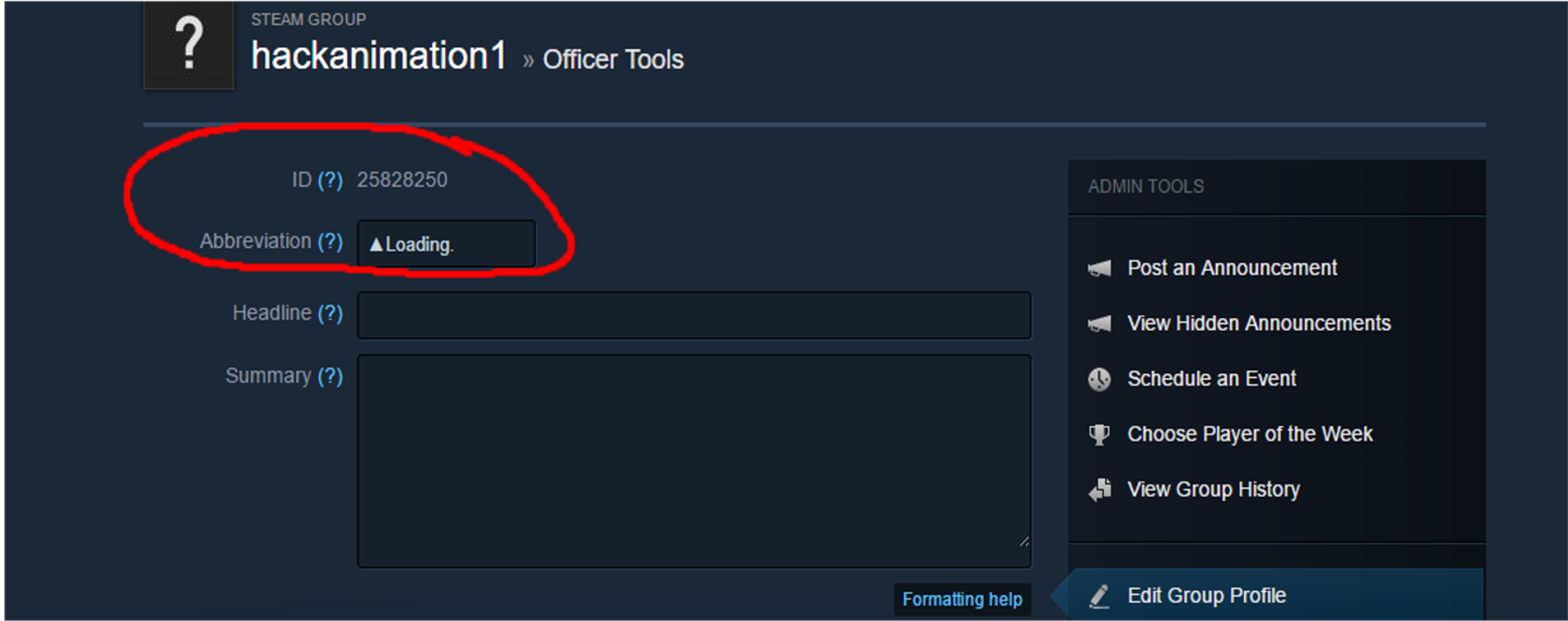
Every steam group is one frame. The important thing there is the abbreviation(the actual frame) . Thats what you and the people will see.
Tipp: Sometimes/in some situations its useful to use special characters/symbols you can find below at the Special Symbols section.

If you're done you will get to your group page where you just can edit your group. If it worked, you should see your group id on the top of the page , which is a basic component and should be marked and saved in a textfile somewhere on your desktop.


This progress you can make as many times as you like(steam max. 10), but dont forget to save the id in your textfile.

2. MAKING/PASTING THE SCRIPT : AUTOEXEC.CFG
Now you navigate into your CsGo File:
Thats my path-> G:\Steam Games\steamapps\common\Counter-Strike Global Offensive\csgo\cfg arrived there, you create a text file and save it as "autoexec.cfg" (if you already have this file just click to edit it)
click to edit this file.

I use the free programm Notepad++[notepad-plus-plus.org]

Copy this in your autoexec.cfg:
alias Tag1 "cl_clanid 'id of your 1st group'; alias TagBind Tag2;" alias Tag2 "cl_clanid 'id of your 2nd group'; alias TagBind Tag3;" alias Tag3 "cl_clanid 'id of your 3rd group'; alias TagBind Tag4;" alias Tag4 "cl_clanid 'id of your 4th group'; alias TagBind Tag5;" alias Tag5 "cl_clanid 'id of your 5th group'; alias TagBind Tag1;" alias TagBind "Tag1"

Paste your group id (in the right order) where you can see 'id of your X group' !!!without the ' !!
So that it looks like this (These are my codes,dont forget to use yours):
alias Tag1 "cl_clanid 25765773; alias TagBind Tag2;" alias Tag2 "cl_clanid 25765789; alias TagBind Tag3;" alias Tag3 "cl_clanid 25765803; alias TagBind Tag4;" alias Tag4 "cl_clanid 25765830; alias TagBind Tag5;" alias Tag5 "cl_clanid 25765836; alias TagBind Tag1;" alias TagBind "Tag1"

Just remove some lines and edit it meaningful if you just wanna use e.g. 2 Frames(2Group abbreviations).

Thus the code for 2 frames would look like this:
alias Tag1 "cl_clanid 25765773; alias TagBind Tag2;" alias Tag2 "cl_clanid 25765789; alias TagBind Tag1;" alias TagBind "Tag1"

You can bind this with w,a,s,d or with a razer programm. If you are a razer User go to 3.2 if you arent one go to 3.1.
3.1 BINDING KEYS : FIRST METHOD W,A,S,D
Here you have 2 ways to bind this.

The normal way:

You use the keys you use very often like the w,a,s,d keys.
Like this:

bind "w" "+forward; TagBind" bind "a" "+moveleft; TagBind" bind "s" "+back; TagBind" bind "d" "+moveright; TagBind"

And paste it after that we've already pasted before like this:
alias Tag1 "cl_clanid 'id of your 1st group'; alias TagBind Tag2;" alias Tag2 "cl_clanid 'id of your 2nd group'; alias TagBind Tag3;" alias Tag3 "cl_clanid 'id of your 3rd group'; alias TagBind Tag4;" alias Tag4 "cl_clanid 'id of your 4th group'; alias TagBind Tag5;" alias Tag5 "cl_clanid 'id of your 5th group'; alias TagBind Tag1;" alias TagBind "Tag1" bind "w" "+forward; TagBind" bind "a" "+moveleft; TagBind" bind "s" "+back; TagBind" bind "d" "+moveright; TagBind"
And dont forget to save. If you have a razer Mouse or Keyboard and wanna use the Razer method go to the second method 3.2 you can find below.

To understand: 'That means if you press "w" you go forward and use the Tagbind.'
"You can simply add keys but dont forget to set also the "normal use" (see above "w" is +forward and TagBinds)"

That works not bad but its not with the same distance between the "frames".
The problem is that it changes the frame by pressing and releasing the key. So if you press w and then release w to press s it will also change the frame. This is so fast that it will just skip some frames.

The better way:
I would recommend to use the w,a,s,d method without the previous code like this:
bind "w" "+forward; groupid" bind "a" "+moveleft; secgroupid" bind "s" "+back; thirdgroupid" bind "d" "+moveright; fourthgroupid"
Just paste only this code in your autoexec.cfg the only problem is that you only can use 4 frames.
Now you should not have the problem with the skipped frames.
You can use more keys or basically only other keys but dont forget to set also the default use.
3.2 BINDING KEYS : RAZER METHOD
Other Way(Razer Method):

I really dont know if you can use other programs do the same, so i also can show how it works for me. I have a razer mouse and keyboard together with the programm Razer Synapse[www.razerzone.com] you can make makros. So i did a makro with 0.5 sec delay on a key you just dont use for anything like F8 key. Basically the key will be pressed every 0.5 sec in the backround without the dependence of your fingers.

!!!IMPORTANT(Razer Synapse):!!!
You have to add manually the last delay!!! Its really important!
Cause you press the key F8 that brings the game to switch to your next frame while the button is still pressed, if you now release the key it will also switch to the next frame.
If you forget this it will always skip a frame(how it looks) because it instantly switch 2 times(how it really is).

!!We use the F8 Key, in the video i use numpad enter but f8 is just better!!!
If you made it you will get a smoothly timed clanTag if you use for example the F8:

bind "F8" "+TagBind"
Paste this code in your autoexec.cfg that it looks like this:
alias Tag1 "cl_clanid 'id of your 1st group'; alias TagBind Tag2;" alias Tag2 "cl_clanid 'id of your 2nd group'; alias TagBind Tag3;" alias Tag3 "cl_clanid 'id of your 3rd group'; alias TagBind Tag4;" alias Tag4 "cl_clanid 'id of your 4th group'; alias TagBind Tag5;" alias Tag5 "cl_clanid 'id of your 5th group'; alias TagBind Tag1;" alias TagBind "Tag1" bind "F8" "+TagBind"

Dont forget to save.

You see its easier for RAZER USERS if you arent one of them, good luck by finding a programm like this.

P.S.: Dont try to edit the abbreviation after you made a group, because it didnt work for me, it didnt change the ingame clantag for some reason. If you wanna remove the clantag you have to delete the groups.
4. FULL SCRIPT
A full script can look like this(Thats what you can find in my autoexec.cfg):
alias Tag1 "cl_clanid 25765773; alias TagBind Tag2;" alias Tag2 "cl_clanid 25765789; alias TagBind Tag3;" alias Tag3 "cl_clanid 25765803; alias TagBind Tag4;" alias Tag4 "cl_clanid 25765830; alias TagBind Tag5;" alias Tag5 "cl_clanid 25765836; alias TagBind Tag1;" alias TagBind "Tag1" bind "F8" "+TagBind"
Thats the Razer method.

alias Tag1 "cl_clanid 25765773; alias TagBind Tag2;" alias Tag2 "cl_clanid 25765789; alias TagBind Tag3;" alias Tag3 "cl_clanid 25765803; alias TagBind Tag4;" alias Tag4 "cl_clanid 25765830; alias TagBind Tag5;" alias Tag5 "cl_clanid 25765836; alias TagBind Tag1;" alias TagBind "Tag1" bind "w" "+forward; TagBind" bind "a" "+moveleft; TagBind" bind "s" "+back; TagBind" bind "d" "+moveright; TagBind"
Thats the w,a,s,d bind.

bind "w" "+forward; groupid" bind "a" "+moveleft; secgroupid" bind "s" "+back; thirdgroupid" bind "d" "+moveright; fourthgroupid"
Thats the better w,a,s,d bind (only 4 frames).
5. INGAME COMMANDS
Then you just have to start your game and open the console.
Use "exec autoexec.cfg" to load your new script.
Normally you only have to use this command once, then it should be saved, so that you dont have to use this command again by for example restarting the game.

If you get the error "Unknown command: +tagBind"
Use this instead of the actual code:
bind "your key" "+ ;TagBind"

There is no way to get a vac from this.

Enjoy!
Have fun!

If you have problems write it in the comments, i will answer as fast as i can.

And dont forget to evaluate.

____________________________________Nexxus____________________________________

SPECIAL SYMBOLS
Here are some sites where you can find special symbols. If you use these symbols in your frames you dont have the problem that your clantag is already being used by someone. The sites are in german but basically you only have to look at the symbols the text is just unimportant.

http://www.weblog-deluxe.de/sonderzeichen-und-symbole-ascii-art-fur-second-life/

http://wintipps.com/tastenkombination-sonderzeichen/

https://www.key-shortcut.com/windows-tastatur/sonderzeichen-windows/

http://typefacts.com/tastaturkuerzel
How a big script can look like that's my actual Script:
alias Tag1 "cl_clanid 25828250; alias tagBind Tag2;" alias Tag2 "cl_clanid 25828261; alias tagBind Tag3;" alias Tag3 "cl_clanid 25828273; alias tagBind Tag4;" alias Tag4 "cl_clanid 25828280; alias tagBind Tag5;" alias Tag5 "cl_clanid 25828292; alias tagBind Tag6;" alias Tag6 "cl_clanid 25828250; alias tagBind Tag7;" alias Tag7 "cl_clanid 25828261; alias tagBind Tag8;" alias Tag8 "cl_clanid 25828273; alias tagBind Tag9;" alias Tag9 "cl_clanid 25828280; alias tagBind Tag10;" alias Tag10 "cl_clanid 25828304; alias tagBind Tag11;" alias Tag11 "cl_clanid 25828250; alias tagBind Tag12;" alias Tag12 "cl_clanid 25828261; alias tagBind Tag13;" alias Tag13 "cl_clanid 25828273; alias tagBind Tag14;" alias Tag14 "cl_clanid 25828280; alias tagBind Tag15;" alias Tag15 "cl_clanid 25828312; alias tagBind Tag16;" alias Tag16 "cl_clanid 25828250; alias tagBind Tag17;" alias Tag17 "cl_clanid 25828261; alias tagBind Tag18;" alias Tag18 "cl_clanid 25828273; alias tagBind Tag19;" alias Tag19 "cl_clanid 25828280; alias tagBind Tag20;" alias Tag20 "cl_clanid 25828327; alias tagBind Tag21;" alias Tag21 "cl_clanid 25828250; alias tagBind Tag22;" alias Tag22 "cl_clanid 25828261; alias tagBind Tag23;" alias Tag23 "cl_clanid 25828273; alias tagBind Tag24;" alias Tag24 "cl_clanid 25828280; alias tagBind Tag25;" alias Tag25 "cl_clanid 25828343; alias tagBind Tag26;" alias Tag26 "cl_clanid 25828250; alias tagBind Tag27;" alias Tag27 "cl_clanid 25828261; alias tagBind Tag28;" alias Tag28 "cl_clanid 25828273; alias tagBind Tag29;" alias Tag29 "cl_clanid 25828280; alias tagBind Tag30;" alias Tag30 "cl_clanid 25828369; alias tagBind Tag31;" alias Tag31 "cl_clanid 25828369; alias tagBind Tag32;" alias Tag32 "cl_clanid 25828369; alias tagBind Tag1;" alias tagbind "tag1" bind "F8" "+ ;tagbind"

Basically the script is the first 4 lines, cause i use them every 6th line.
Ingame youc an see this :
▲Loading.
►Loading..
▼Loading...
◄Loading....

Between this 4 lines i have some different lines.
The frames are basically arranged like this:
▲Loading.
►Loading..
▼Loading...
◄Loading....
►Aimlock✔
▲Loading.
►Loading..
▼Loading...
◄Loading....
►Wallhack✔
▲Loading.
►Loading..
▼Loading...
◄Loading....
►Speedhack✔
▲Loading.
►Loading..
▼Loading...
◄Loading....
►NoRecoil✔
▲Loading.
►Loading..
▼Loading...
◄Loading....
►KQLY.exe✔
▲Loading.
►Loading..
▼Loading...
◄Loading....
►Finished✔✔✔

I bound "F8". Because i searched for a key who still do nothing, because if you use the razer method and you bound e.g. "-" it will instantly open and close the chat because thats my default key for the chat. F8 still does nothing also if you tap on your desktop for example, what could be a problem if you use other keys.

If you wanna use this script just join these Groups, but dont forget this only works with Razer Synapse:

- http://steamproxy.com/groups/hackanimation1
- http://steamproxy.com/groups/Hackanimation2
- http://steamproxy.com/groups/hackanimation3
- http://steamproxy.com/groups/Hackanimation4
- http://steamproxy.com/groups/aimlockactivated1
- http://steamproxy.com/groups/Speedhackactivated1
- http://steamproxy.com/groups/Wallhackactivated1
- http://steamproxy.com/groups/NoRecoilactivated1
- http://steamproxy.com/groups/kqlyhack1
- http://steamproxy.com/groups/EndofmyAnimation1

38 Comments
patski 25 Jul, 2020 @ 10:58am 
How do I save it? Every time I re-open the game I have to do it again
noobsenpai 27 May, 2020 @ 8:08am 
how to remove ?
Gotchits 3 Nov, 2019 @ 1:57pm 
It does work very well. I didn't noticed this: P.S.: Dont try to edit the abbreviation after you made a group, because it didnt work for me, it didnt change the ingame clantag for some reason. If you wanna remove the clantag you have to delete the groups.
And so coicidently every time i had changed it and so it did not work. Be it the wasd or the razer method
rohaanS 2 Feb, 2019 @ 9:10pm 
thank you after an hour of slaving away this worked
yung lean (real) 1 Jan, 2019 @ 7:26am 
huh didnt work :(
SUBUWU 17 Nov, 2018 @ 10:05am 
Genius man! I saw my friend using some ♥♥♥♥ programs to do this, so i wanted to do it too, but wasn't sure if it was secure. Then i saw this thread. OMG, amazing work man!
Doppio 13 Jul, 2018 @ 11:18pm 
I don't play CS:GO much anymore, but I've used the instructions in this guide to continue using the animated clan tag for a while now. This should be one of the top guides! Though, if it were, 'animated clan tags' would be fairly common and it wouldn't really be as special as it is
nexxus  [author] 17 Nov, 2017 @ 7:06am 
Maybe you forgot to paste the delay after the Razer Command. Watch my video at 0:33. I hope i could help ya. https://youtu.be/3T_qV2AISUI?t=33
Hero 20 Oct, 2017 @ 4:14pm 
I use the razer setup and did exactly what you did in the video, but when i press the button and i look in my console it fires like 10 commands in an instant and says too many commands. Any idears of why this happens?
Dylxn 30 Jun, 2017 @ 9:29pm 
Hey man, I'm working on a pretty big project called Guide Hub, It's a steam group where avid Guide creators can share their guides in one hub, Easy navigation, Forums and way more, seeing how well put together your guides are I'd love to have you help me with this! Friend me if you're interested!