Dead Island Definitive Edition

Dead Island Definitive Edition

Not enough ratings
Dead Island Definitive Edition Modding Guide
By Overkiller [GKD]
Note: Before you thank me for that guide, go ahead and show IIFearII some love for creating a huge overhaul mod for Dead Island. If he had not released it, I would have never made this guide.

Why did I create this guide?

First of all, there aren´t that many sources for modding Dead Island anymore, I just want to make an guide that is easily accessable and gives an short insight into the modding scene. Another reason why I created this guide is to improve my English skills and tweaking the game as I like.

Something missing or wrong about this guide?

Feel free to send me a friends request or leave a comment.
   
Award
Favorite
Favorited
Unfavorite
File Types [WIP]
  • .xui (conatins values - xml)
  • .scr (source file - contains functions - maybe c language)
  • .def (define variables)
  • .loot (?? )
  • .phx (physics)
Prerequirements
Before you can start modding Dead Island you will need to download the following software:

  • 7zip
  • notepad++ (optional)
  • Python (optional for workspace)

After successfully installing 7zip you can locate your game files.
Locate Game Files
  1. open "Steam"
  2. search for "Dead Island Definitive Edition" in your steam library
  3. right-click on the game and hit "Properties"
  4. "Local Files" --> "Browse Local Files"
  5. windows explorer with the DIDE root folder should be opened
Create Data3.pak
Note: Data3.pak is going to contain all scripts that we modified, it would be possible make these changes in Data0-2 but this could easily break the game.

  1. create an folder and name it "data"
  2. right-click on the data folder and select "7zip" --> "create an archive"
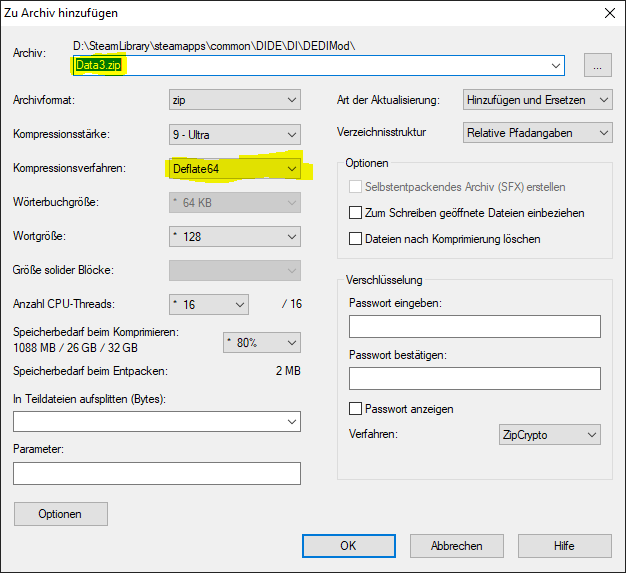
  3. change the name to "Data3.pak" and check the compression (check next picture)

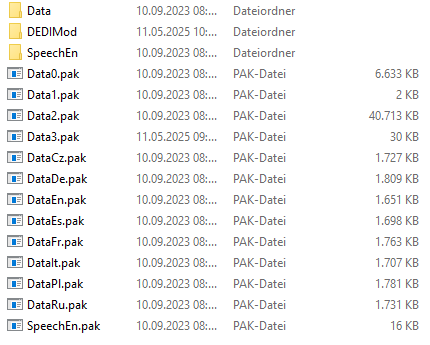
  4. move Data3.pak to the "DIDE\DI\*" folder (check next picture)

Create First Script
Now that everything is prepaired you can start checking the game files, in this example I am going to add an text to the main menu.

  1. go to the "DIDE\DI" folder
  2. right-click "Data0.pak" and open it with 7zip
  3. this archive contains data folder with many scripts
  4. copy the "data/menu/scr/menumain_pc.xui" to another place
  5. open "menumain_pc.xui" with notepad++
  6. add the following code to your file (line 75)
    <MyText> <Properties> <Id>T_ModName</Id> <Width>600.000000</Width> <Height>40.000000</Height> <Position>165.000000,50.000000,0.000000</Position> <TextColor>0xffebebeb</TextColor> <Font>TextHuge</Font> <TextStyle>528</TextStyle> <VerticalAlignDown>true</VerticalAlignDown> <Outline>true</Outline> <Text>Overkillers Dead Island</Text> </Properties> </MyText>
  7. save the changes
  8. copy the "menumain_pc.xui" file into "Data3.pak" (data/menu/scr/menumain_pc.xui)
  9. start the game
Modify Skill Trees
Before we can start modifiying the Skill Trees, we have to talk about which file will be needed.

  • data/skills/xian_skills.xml (contains skill tree for xian)
  • data/menu/texturedefs/skills.scr (contains the texture of the skills)
  • data/texts_temp.scr (contains the strings)
  • data/skills/active_skills.scr (contains the active skills)
Note: all of these files are located in Data0.pak

If you copied all the files, we can start modifying them.


data/skills/xian_skills.xml:
  1. open "xian_skills.xml"
  2. remove everything except
    <character_req value="xian_levels.xml"> <postfix id="Xian"> </postfix> </character_req>
  3. add the following code
    <!-- FURY --> <skill id="OVKX_FuryUnlock" cat="Tree1" max_level="1" tier="0"> <effect id="FuryLevel" change="1"/> <effect id="FuryUsage" change="0.10"/> <effect id="FuryPointsAfterKill" change="0.05"/> </skill> <skill id="OVKX_FuryUpgrade" cat="Tree1" max_level="3" tier="1" desc_params="+10%;+20%;+30%"> <tier_req tier="0" cat="Tree1" value="1"/> <effect id="FuryPointsAfterKill" change="0.1"/> </skill>
  4. the code should look like this now
    <character_req value="xian_levels.xml"> <postfix id="Xian"> <!-- FURY --> <skill id="OVKX_FuryUnlock" cat="Tree1" max_level="1" tier="0"> <effect id="FuryLevel" change="1"/> <effect id="FuryUsage" change="0.10"/> <effect id="FuryPointsAfterKill" change="0.05"/> </skill> <skill id="OVKX_FuryUpgrade" cat="Tree1" max_level="3" tier="1" desc_params="+10%;+20%;+30%"> <tier_req tier="0" cat="Tree1" value="1"/> <effect id="FuryPointsAfterKill" change="0.1"/> </skill> </postfix> </character_req>


data/menu/texturedefs/skills.scr:
  1. open "skills.scr"
  2. go to line 263 before the "}" and hit "enter" to make a new line
  3. add skill+name as first param and the second param is texture
    Rect("skill_OVKX_FuryUnlock", 710, 253, 781, 324) Rect("skill_OVKX_FuryUpgrade", 284, 466, 355, 537)


data/texts_temp.scr:
  1. open "texts_temp.scr"
  2. get to the last line
  3. add the code
    // Xian String("Skill_OVKX_FuryUnlock", "Fury") String("SkillDesc_OVKX_FuryUnlock", "Xian Fury") String("Skill_OVKX_FuryUpgrade", "Upgrade Fury") String("SkillDesc_OVKX_FuryUpgrade", "Increases points after kill") String("SkillDesc_OVKX_FuryUpgrade1", "+10%") String("SkillDesc_OVKX_FuryUpgrade2", "+20%") String("SkillDesc_OVKX_FuryUpgrade3", "+30%")


data/skills/active_skills.scr:
Note: Only has to be modified, if active skill has been changed
  1. open "active_skill.scr"
  2. change line 5 to the following code
    ActiveSkillData("OVKX_FuryUnlockXian", 0, "xian_bladefighter", "") //"Blade fighter"


Now you have to add those 4 files to the Data3.pak and run the game.
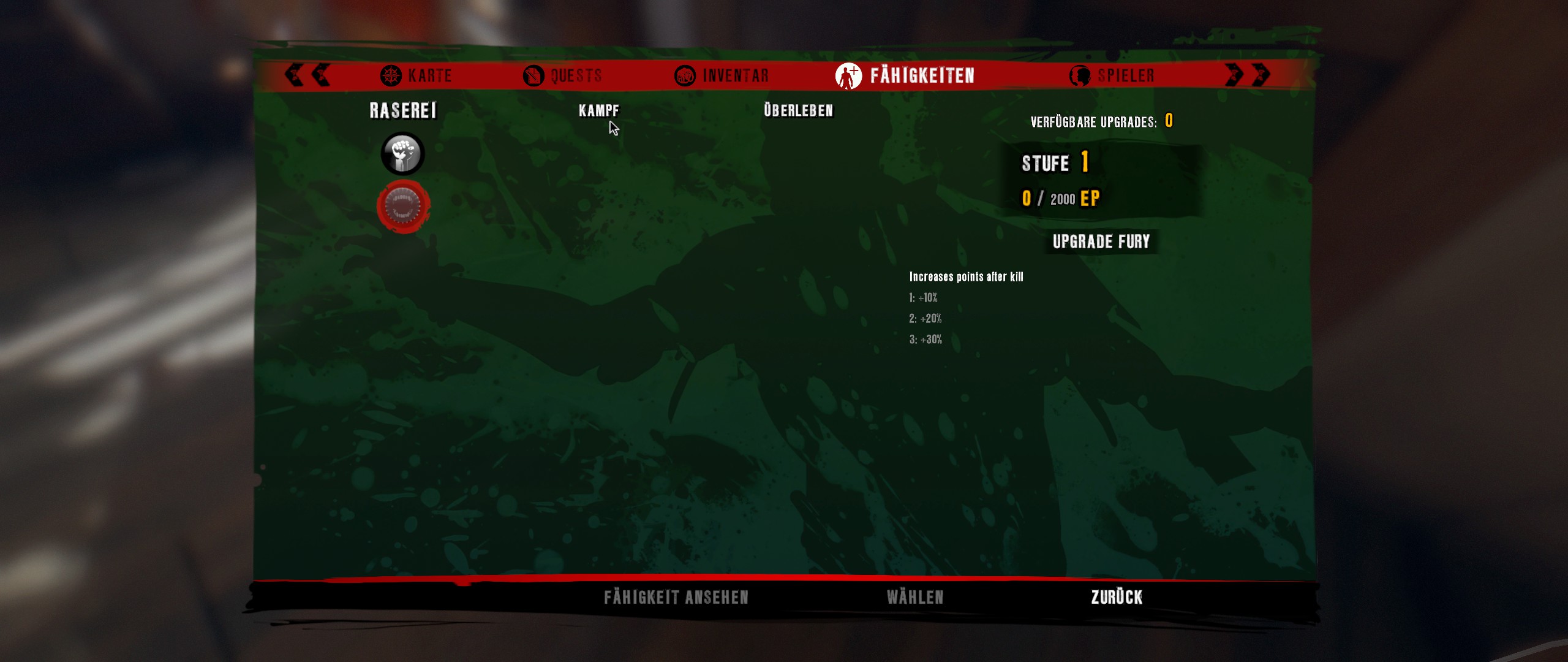
Create a new character and check your skill tree, it should look like the following:

Modify Player Data
Files that will be needed:
  • default_levels.xml (contains the base stats for all players)
  • xian_levels.xml (contains the values that are changed for xian)


Character specific changes (Xian)

  1. open "xian_levels.xml"
  2. change line 7 to
    <prop n="MoveSprintStaminaConsumption" v="0.01"/>
  3. add modified file to Data3.pak

Note 1: After changing these values you have to create a new character, otherwise it does not work.
Note 2: If you want to have a value that stays the same for all characters, you have to remove the overwritten values in the character specific file (for example xian_levels.xml)
Modify AI
Note : tested for zombie, infected and human

Before you can change the AI, you have to decide which type of AI you want to change. In this example I am going to use the infected AI.

  • data/ai/infected/infected_data.scr (contains the base values for all infected)
  • data/ai/infected/infected_data_preset_custom_9.scr (contains the changed values for big infected)
Note: all of these files are located in Data0.pak


data/ai/infected/infected_data.scr:
  1. open "infected_data.scr"
  2. scroll down to the bottom
  3. change "acceleration" to "-1" (line 519)
  4. change "deceleration" to "-1" (line 520)


data/ai/infected/infected_data_preset_custom_9.scr:
  1. open "infected_data_preset_custom_9.scr"
  2. change "walk_speed_calm" to "10" (line 12)
  3. change "walk_speed_alarmed" to "10" (line 13)


Now you just have to add these 2 files to the "Data3.pak" and run the game.
Create Workspace
Note: the following scripts are made with ChatGPT, they could contain bad coding/syntax

Since it can be pretty time-consuming to manually add the files to the Data3.pak, you can use Python to make it faster.

List of scripts:
  • create_zip.py (creates a Data3.pak from the data folder)
  • format_xml.py (formats an xml to be more readable)


How to create Python scripts:
  1. create a new folder "ExampleFolder"
  2. inside the ExampleFolder, you will need two more "data" and "tools"
  3. add all your file that you have modified into the "data" folder
  4. start "IDLE python" and add the following code
    import xml.etree.ElementTree as ET import xml.dom.minidom import sys import os def format_xml(file_path, output_dir, tab_size="\t"): if not os.path.exists(file_path): print(f"❌ File not found: {file_path}") return # Create output directory if it doesn't exist os.makedirs(output_dir, exist_ok=True) try: # Parse and convert to string tree = ET.parse(file_path) xml_str = ET.tostring(tree.getroot(), encoding='utf-8') # Pretty-print with tabs parsed = xml.dom.minidom.parseString(xml_str) pretty_xml = parsed.toprettyxml(indent=tab_size) # Clean blank lines and remove XML declaration lines = pretty_xml.splitlines() cleaned_lines = [line for line in lines if line.strip() != ''] if cleaned_lines[0].startswith("<?xml"): cleaned_lines = cleaned_lines[1:] cleaned_xml = "\n".join(cleaned_lines) # Create new file in user-specified directory filename = os.path.basename(file_path) output_file = os.path.join(output_dir, filename) with open(output_file, 'w', encoding='utf-8') as f: f.write(cleaned_xml) print(f"✅ Formatted file saved as: {output_file}") except Exception as e: print(f"⚠️ Error formatting {file_path}: {e}") # Drag-and-drop entry point if __name__ == "__main__": if len(sys.argv) < 2: print("Drag and drop a .xui (XML) file onto this script to format it.") else: output_dir = "formatted" for path in sys.argv[1:]: format_xml(path, output_dir)
  5. save as "DIDE/DI/ExampleFolder/tools/format_xml.py"
  6. delete everything in "IDLE python"
  7. add the following code
    import os import zipfile def zip_folder_with_root(source_folder, output_zip): # Delete old zip if it exists if os.path.exists(output_zip): os.remove(output_zip) print(f"Old zip file '{output_zip}' removed.") folder_base = os.path.basename(os.path.normpath(source_folder)) with zipfile.ZipFile(output_zip, 'w', zipfile.ZIP_DEFLATED) as zipf: for root, _, files in os.walk(source_folder): for file in files: full_path = os.path.join(root, file) arcname = os.path.join(folder_base, os.path.relpath(full_path, start=source_folder)) zipf.write(full_path, arcname) print(f"New archive created: '{output_zip}'") # create Data3.pak if __name__ == "__main__": zip_folder_with_root('../data', '../../Data3.pak')
  8. save as "DIDE/DI/ExampleFolder/tools/create_zip.py"


How to use these scripts?

  • double click on "create_zip.py" to create Data3.pak into "DIDE/DI/*"
  • drag and drop an .xml or .xui onto the "format_xml.py", it will create an folder inside "ExampleFolder/tools/*" called "formatted", this is going to have all the formatted xml files