RoboCop: Rogue City

RoboCop: Rogue City

Not enough ratings
Set custom FOV
By Shodan v3.0
The game luckily has FOV slider, but its max value aka '100' might not be enough for bigger screens. Since I play 110 as optimal, I've checked its configs and fix is rather simple:

1) Navigate to C:\Users\XYZ\AppData\Local\RoboCop\Saved\Config\Windows (where XYZ is your username)

2) Open the GameUserSettings.ini file with a text editor (Notepad++ recommended)

3) find value 'FieldOfView' and set it to your desired FOV (ex. FieldOfView=111.000000)

4) OPTIONAL: If you wish to have a custom ingame FOV slider options find lines 'BaseMinFieldOfView' and 'BaseMaxFieldOfView'; they should be right after the value from step 3. Set them to your desired FOV range but NOTE that very large values will cause image distortion and possible other glitches.

4a) Once you're done, ini section should look something like this:
FieldOfView=111.000000
BaseMinFieldOfView=80.000000
BaseMaxFieldOfView=120.000000

5) Save the changes in GameUserSettings.ini file

6) Start the game

That's it, enjoy.
   
Award
Favorite
Favorited
Unfavorite
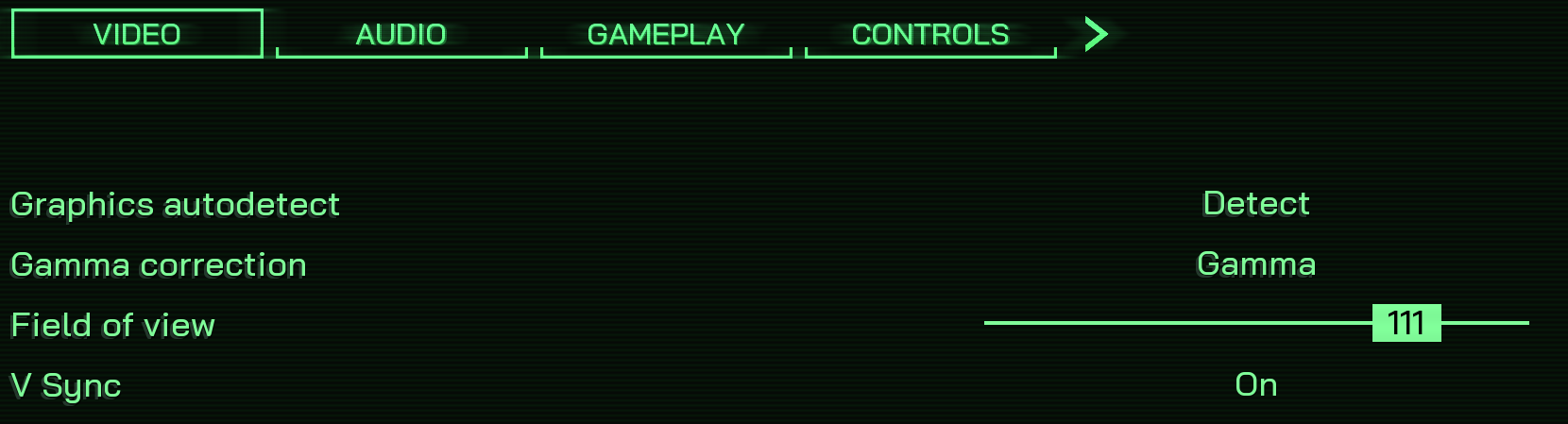
Verify new FOV ingame

Post-edit ingame options should reflect the changes we did with Min and Max values
5 Comments
Wrath 13 Jun @ 4:56pm 
were
Snakes 21 Mar @ 3:12pm 
I don't seem to have a game settings text document
Kweeb 4 Dec, 2023 @ 10:08pm 
Every game should have the option for the FOV to be adjusted the way this game does.

I even set minimum to 10 for the heck of it, in-game minimum was 10.
Shodan v3.0  [author] 4 Nov, 2023 @ 5:45pm 
You're welcome ^^
That was the first thing I looked how to fix since the demo. 100 is too zoomed-in on 32" monitor.
mvp42699 3 Nov, 2023 @ 2:50pm 
Thank you for this guide 100 wasn't enough for me i like 120 :steamhappy: