The Lord of the Rings: War in the North

The Lord of the Rings: War in the North

Not enough ratings
How to Launch The Game - 2023
By Snory
As a bit of backstory, me and my brother would play this game co-op through all the difficulty levels. He would always be the dwarf and I would be the ranger. We owned the game on the XBOX360 and still do. I decided to re-purchase a key for the game on steam in case the Xbox ever broke or the disk was damaged, as well as for nostalgia reasons. However launching the game wasn't working and information on how to run the game was a bit all over the place in varying forums and discussion threads. So I decided to just make a brief info guide on what I did to launch the game.
   
Award
Favorite
Favorited
Unfavorite
Launching The Game
1. First install the game, it's a small game compared to file sizes of today's standard so it shouldn't take long to download.

2. The first step I took was just launching the game straight up which in hindsight wasn't going to work. With people such as myself having operating systems such as Windows 11 that just can't run such old games. At this stage of configuration the game launches, there is an icon of the game on the taskbar and my mouse is unable to move to my second monitor. As if the game is in full screen mode. There is currently no display of the game on my screen.

3. Verifying Game Files was the next step I took, it said that there were two files missing which it then proceeds to download however re-verifying the files says they were still missing and bobs your uncle the game still doesn't launch properly. The game is still launching in the same state as mentioned above.

4. The next step is to change the properties of the game file. It might sound complicated but it's very easy to do.

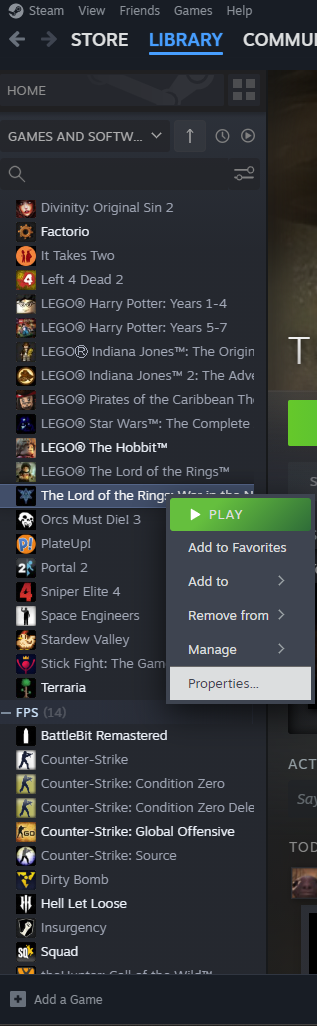
- Click on your steam library scroll to the game, in this case War Of The Ring.
- Right Click on it go to Properties -> Installed Files -> Browse. Alternatively click Manage
-> Browse Local Files
- This should open up your folder. Look for a file called witn.exe it should have an icon
whereas a lot of the other files don't.


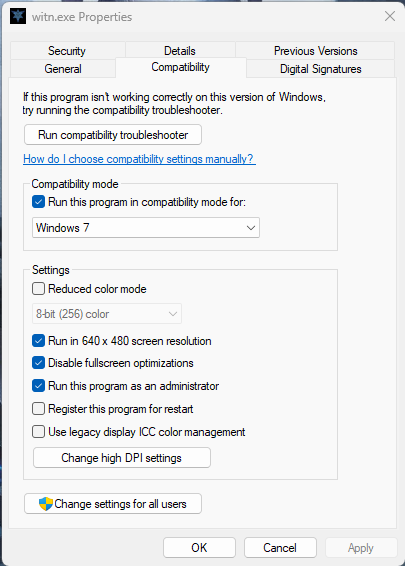
- Right click on it and got to properties -> compatibility

- Just follow what I've ticked/selected and your game should now properly launch after applying the changes. Just re-launch the game on steam.
Side Note
I have written this guide just after being able to run the game so I don't know if there will be any other issues such as crashes whilst playing etc. Maybe changing to an even earlier operating system might be better I don't know. My whole reason for writing this guide is to document how I launched the game for other people who might be lost on how to do so, and for the information to all be in one place.

I'm no tech wizard, i just followed advice from random threads on the internet and decided to compile my findings here so don't ask me questions as I most likely won't be able to help you sorry.


Links I found that helped:
https://www.youtube.com/watch?v=gXuz8F4Tg_Q&ab_channel=Yaakab12YHW

https://steamproxy.com/app/32800/discussions/0/1354868867708519270/

https://www.reddit.com/r/gaming/comments/nuas9b/lotr_war_in_the_north_not_working_from_steam/
5 Comments
sojourner 13 May @ 8:22am 
Thanks for the help :)
Ao 10 May @ 7:10pm 
Awesome! This worked for me in 2025.
asmcint 17 Jun, 2024 @ 6:08am 
The only parts of this that actually impact the game's ability to run are setting compatibility mode and running as administrator.

Compatibility mode also reduces crash frequency for those who can get the game to launch without it, and makes it behave more when installed on a drive other than C.0

Fullscreen optimizations were a thing on Windows 7 when this game came out, and running in 640x480 is an option specifically for Win9x era programs which were not made to expect higher resolutions or different aspect ratios.
Metacarpals 1 Apr, 2024 @ 6:53am 
Thanks, man! Thoughtful of you to share this! : )
Crusty Ass Dude Dickless 19 Oct, 2023 @ 8:43am 
Thank you, been trying to get this fixed for the past few days and now works