Only Up!

Only Up!

Not enough ratings
Uncap FPS
By everytime
How To Cap your FPS to whatever you want
   
Award
Favorite
Favorited
Unfavorite
How To Change FPS Cap
Windows Key + R and Type Appdata Then Press Enter

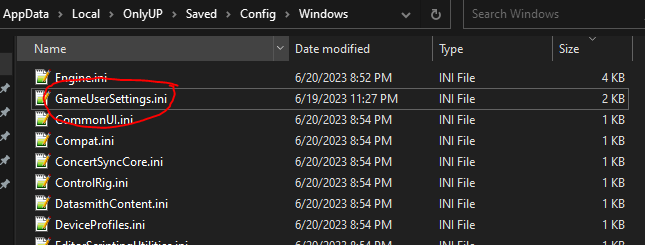
Go To Appdata > Local > OnlyUP > Saved > Config > Windows > GameUserSettings.ini

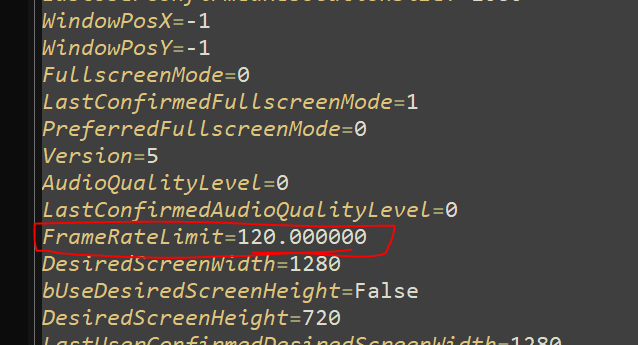
In this File look for "FrameRateLimit=X"
Change the X Into the FPS that you want
For Example ("FrameRateLimit=120.000")
then after you type that into the File Make sure to save the file.
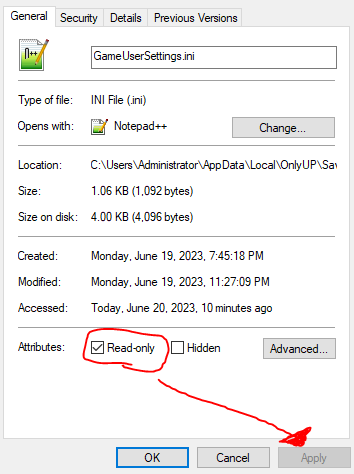
Once Saved then Right Click GameUserSettings.ini and Check "Read-only" Once you check that then Go in Game
Once you are in game open the Settings then Hit the "Save" button and That Should Be it

[SPANISH] (credit -> PeterPan)

En este archivo busque "FrameRateLimit=X"
Cambia la X a los FPS que quieras
Por ejemplo ("FrameRateLimit=120.000")
luego, después de escribir eso en el archivo, asegúrese de guardar el archivo.
Una vez guardado, haga clic con el botón derecho en GameUserSettings.ini y marque "Solo lectura". Una vez que verifique eso, vaya al juego.
Una vez que esté en el juego, abra la Configuración, luego presione el botón "Guardar" y eso debería ser todo.

(update: Run the Game as Administrator When Launching)
(actualización: Ejecute el juego como administrador al iniciarlo)


STEPS BELOW
PASOS A CONTINUACIÓN

STEP 1


STEP 2


STEP 3
13 Comments
dark_nilime 12 Aug, 2024 @ 4:43pm 
lol
Vernsse 22 Jul, 2023 @ 10:22pm 
lol
Andy Dufresne 11 Jul, 2023 @ 8:18am 
o\k
everytime  [author] 2 Jul, 2023 @ 2:00pm 
He is Boosted, currently I have nothing for permanent 120 but hopefully soon there will be a fix for that, I will update the guide if there is a fix for that.
He is Boosted. 2 Jul, 2023 @ 11:21am 
game defaults to 60 capped ingame? any fix for this :/ until i press 120 ingame its maxed at the 60.
everytime  [author] 29 Jun, 2023 @ 2:50pm 
w.wmqllnaeq, I was working on that earlier but had no luck but hopefully soon devs will add that feature soon
как нeхуй петь 29 Jun, 2023 @ 1:58pm 
how to change control in only up help pls
everytime  [author] 26 Jun, 2023 @ 5:21pm 
ty PeterPan
askkk 26 Jun, 2023 @ 2:55pm 
spanish:
En este archivo busque "FrameRateLimit=X"
Cambia la X a los FPS que quieras
Por ejemplo ("FrameRateLimit=120.000")
luego, después de escribir eso en el archivo, asegúrese de guardar el archivo.
Una vez guardado, haga clic con el botón derecho en GameUserSettings.ini y marque "Solo lectura". Una vez que verifique eso, vaya al juego.
Una vez que esté en el juego, abra la Configuración, luego presione el botón "Guardar" y eso debería ser todo.
everytime  [author] 22 Jun, 2023 @ 10:25pm 
no problem