



Install Steam
login
|
language
简体中文 (Simplified Chinese)
繁體中文 (Traditional Chinese)
日本語 (Japanese)
한국어 (Korean)
ไทย (Thai)
Български (Bulgarian)
Čeština (Czech)
Dansk (Danish)
Deutsch (German)
Español - España (Spanish - Spain)
Español - Latinoamérica (Spanish - Latin America)
Ελληνικά (Greek)
Français (French)
Italiano (Italian)
Bahasa Indonesia (Indonesian)
Magyar (Hungarian)
Nederlands (Dutch)
Norsk (Norwegian)
Polski (Polish)
Português (Portuguese - Portugal)
Português - Brasil (Portuguese - Brazil)
Română (Romanian)
Русский (Russian)
Suomi (Finnish)
Svenska (Swedish)
Türkçe (Turkish)
Tiếng Việt (Vietnamese)
Українська (Ukrainian)
Report a translation problem









 Award
Award



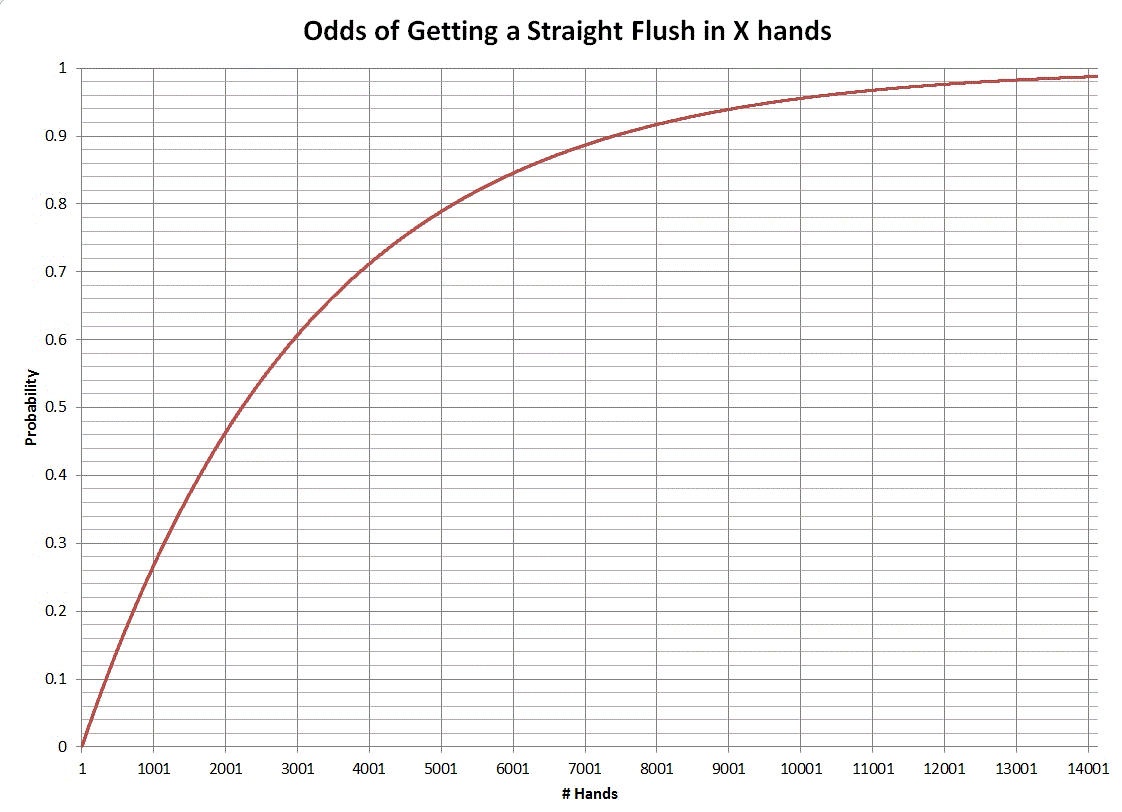


[code]
#NoEnv ; Recommended for performance and compatibility with future AutoHotkey releases.
; Script for auto playing Poker Night at the Inventory (800x600 resolution required)
SendMode Input ; Recommended for new scripts due to its superior speed and reliability.
CoordMode, Mouse, Client
SetDefaultMouseSpeed, 0
Loop {
IfWinActive, Poker Night at the Inventory
{
; Click call
Click, 200, 500
Sleep 5
; Skip dialogue
Click, right, 200, 500, 5
; Deal new match
Click, 400, 500
Sleep, 501
}
}
; Press Pause key to pause script(replace with #p for windows key + p), ESC to exit.
Pause::Pause
Escape::ExitApp
[code]
This worked for me.
; This script will keep playing Poker Night at the Inventory
SetDefaultMouseSpeed 0
WinWaitActive "Poker Night at the Inventory"
Run()
; To stop the application at any time, simply press the Escape button
Escape::ExitApp
;Run the whole application indefinitely
Run() {
while true {
ClickCall()
SkipDialogue()
DealNewGame()
SkipReward()
Sleep 500
}
}
ClickCall()
{
Click 180,500
Sleep 5
}
SkipDialogue()
{
Click 180,500, "Right"
sleep 1
Click 180,500, "Right"
sleep 1
Click 180,500, "Right"
sleep 1
Click 180,500, "Right"
sleep 1
Click 180,500, "Right"
sleep 1
}
DealNewGame()
{
Click 550,510
sleep 5
}
SkipReward()
{
Click 555,420
Sleep 1
}
#Requires AutoHotkey v2.0
; This script will keep playing Poker Night at the Inventory
SetDefaultMouseSpeed 0
WinWaitActive "Poker Night at the Inventory"
Run()
; To stop the application at any time, simply press the Escape button
Escape::ExitApp
;Run the whole application indefinitely
Run() {
while true {
ClickCall()
SkipDialogue()
DealNewGame()
Sleep 500
}
}
ClickCall()
{
Click 169,537
Sleep 1
}
SkipDialogue()
{
Click 182, 520, "Right"
Sleep 1
}
DealNewGame()
{
Click 550,510
Sleep 1
}
I'll tell how long it took me. Works like a charm though!