The Elder Scrolls V: Skyrim

The Elder Scrolls V: Skyrim

Not enough ratings
How to fix micro stuttering in first person
By about 47 t-rexes
Ever had the issue where playing in first person is a stuttering mess but third person is fine? I did, and it was annoying to fix. Hopefully this guide can save you some frustration.
   
Award
Favorite
Favorited
Unfavorite
Intro
I have two potential fixes listed here. I ended up using both at the same time to fix the issue on my end, but it is possible that just one of them could do the trick for you.
Fix 1: Lock Your Framerate
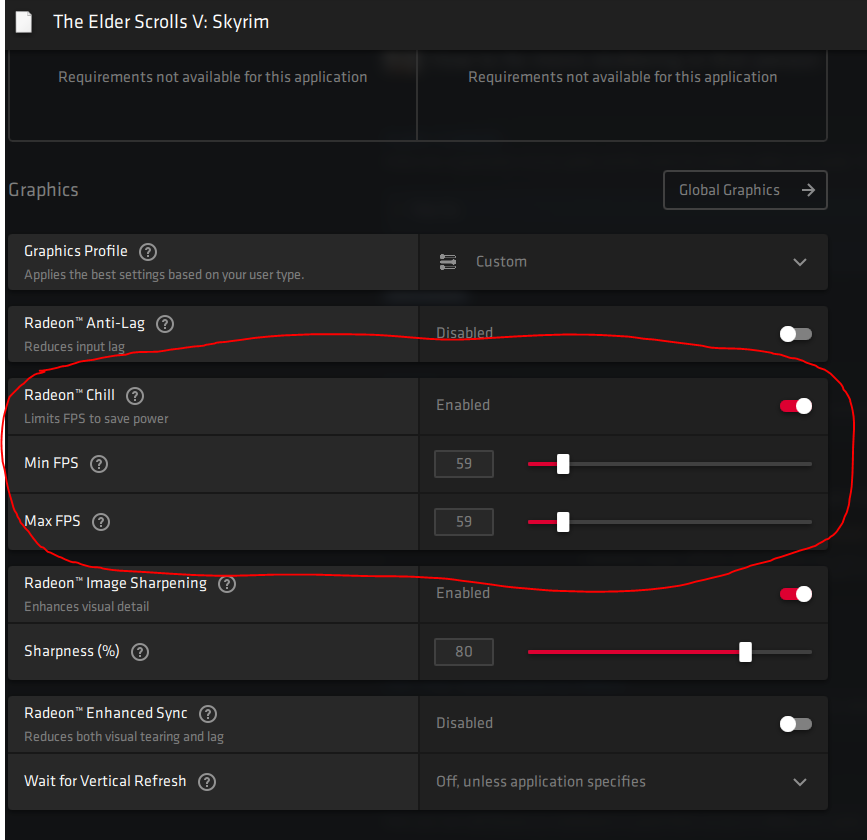
The first is to lock your frame-rate to 59 fps instead of 60. I did this in Radeon software since I have an AMD card. Nvidia and Intel should have similar options in their control panels.


I am using a monitor with a 60Hz refresh rate and am not using FreeSync. Your results may vary if your display is different.
Fix 2: Disable Mouse Acceleration
The second thing to try is disabling mouse acceleration.

You can do this by going editing "SkyrimPrefs.ini" in \Users\[Username]\My Documents\My Games\Skyrim.

Change "bMouseAcceleration=1" to "bMouseAcceleration=0".
Good Luck!
That is all there is to it, hope this helps someone!
17 Comments
about 47 t-rexes  [author] 6 Jul, 2021 @ 12:26pm 
Now that's something I never thought of, thanks for the advice! Ever thought of making a guide on that?
Horus-fr 6 Jul, 2021 @ 8:04am 
I did this on a 9900k and now on a 5950x, this tweak is game changing for many games for example subnautica 1, fligth simulator, sykrim, torchlight 2 some games can handle many threads/cores like borderlands 3 but it's like 1% of games and mostly AAAs
Horus-fr 6 Jul, 2021 @ 7:54am 
more advanced tip for you, something that has been true for years but that since no influencers ever talk about it's completely buried and only hardcore gamers use it CPU affinity, all those cores cpus have nowadays ? games HATE them, they do not want no use 8-16 cores -> stuttering happens when the game jumps from thread to thread rather than stay on the same ones the original skyrim 1) doesn't work well with hyper-threading 2) doesn't use more than 4-5 cores basically (and I mean threads) so try this launch game->task manager details->right click skyrim.exe->cpu affinity and select only 4 threads (for example cpu0-cpu2-cpu4-cpu6) 100% it'll run better than if you leave the game do what he wants (process lasso app allows you to store profiles for various games, task manager you have to redo every time)
Winged Wolf 2 Jul, 2021 @ 12:25am 
Thank *you* for your contribution :)
about 47 t-rexes  [author] 1 Jul, 2021 @ 10:59pm 
Thanks for the info Wolf, cool to know how that fix actually works. I updated the guide with my specs, thanks for the suggestion!
Winged Wolf 30 Jun, 2021 @ 7:15pm 
I wondered because the 59FPS limit in 60Hz displays has been around for many years, and used in many different games. This fixed the micro-stuttering issue because framerates are hard to accurately limit. 60FPS will vary a lot between 59.9 and 60.1 which will cause tearing or (if VSync enabled) micro-stuttering (due to frame skipping).

It might be worth mentioning your screen refresh rate in the guide since a player with a different refresh rate (say 120Hz) may benefit from limiting the framerate to 119.

If a player with a different refresh rate (let's say 75Hz now) doesn't benefit from this, it might be due to the fact that the stuttering is not related to frame synchronization but an internal speed of the engine (such as the physics engine, which works best at no more than 60FPS).

What I'm trying to say is, if you don't know whether this fix is refresh rate related or not, it might be best to point this out in the guide.
about 47 t-rexes  [author] 30 Jun, 2021 @ 11:58am 
Yes I have a 60Hz refresh rate, and no I am not using FreeSync
Winged Wolf 30 Jun, 2021 @ 10:33am 
This fix would make sense in some scenarios but I need more context to it. Is your display's refresh rate 60Hz by any chance? Are you using FreeSync?
about 47 t-rexes  [author] 28 Jun, 2021 @ 11:48am 
Glad I could help!
Scarecrow 28 Jun, 2021 @ 7:05am 
Thank you su much man, finally after 7 years playing this game those annoying microstutters are gone!