Team Fortress 2

Team Fortress 2

194 ratings
How to Practice Rocket Jumping (On any map!)
By Shanblu
Hello! Before we start with this guide I would like to say that this is my first guide I have ever made. Please feel free to leave constructive criticism in the comments below. I always want to know how to improve! (Thumbnail from STAR_ on Youtube)

Anyway, welcome to my guide on practicing rocket jumping on any map (or custom map) of your choice. If you want to learn how to Market Garden or use bots, this guide is not for you. Instead you will learn how to set up a map that you want to practice a specific rollout/jump on over and over again. This guide also involves many commands and configurations in the console, but it is all very simple if you follow the exact steps.

By the end you will be able to practice on any map, without the distraction of other players or worrying about health/ammo.
2
   
Award
Favorite
Favorited
Unfavorite
Setting Up Your Practice Area
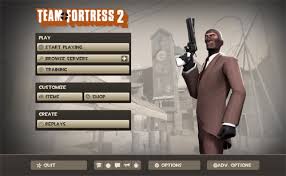
The first thing you will have to do to get into a server by yourself is be at the main menu. As long as you don't have a Custom HUD your menu should look like this.


Now find the options button, located at the bottom of your screen.


Clicking that will make this window pop up:


Now click Advanced, which is also located toward the bottom of the window. That will make this page pop up.


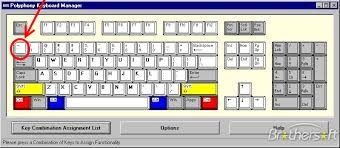
Now make sure to check the box that says "Enable developer console", then click OK. This will allow you to open up a console which can be used to type in tons of useful commands. To open the console, press ` on your keyboard, located on the top left if you have a standard keyboard.


Now you have this pulled up:


Now comes the tricky part which involves many commands, although most of that will be saved for when you are actually ingame. Now find the bar at the bottom of the console screen which is where you will be typing in all of the various commands used.

Now you can choose which map you would like to practice on. I am using koth_harvest_final, but you can use whatever map you want. You can even use custom maps as long as you have them downloaded.

Now type

map koth_harvest_final

That is an example, it can be changed to whatever map you like. Make sure you have the exact name correct though, or it will not work. Once you have typed this in, click submit or press enter on your keyboard. Now all you have to do is wait a moment for your map to load.
Ingame (Commands to help you practice.)


Hooray! You've made it ingame. For this example I am in koth_harvest_final but as long as you typed in your map name correctly you should be in it.

Now to get into the commands, probably the trickiest part of this guide as they have to be typed in EXACTLY right for everything to work.

Press esc to go to your menu. If the console is not up press ` to reopen it. Right off the bat you will want to type in the console:

sv_cheats 1

This enables the commands you will be using to practice. Now type in the console:

mp_tournament 1

This makes the timer on your match infinite so you can practice for as long as you like. This is not necessary if you are playing on a King of the Hill Map but if you are on a gamemode such as Payload where there is a clock ticking down you will want to do this.

These next two commands are optional, but are good time-savers. The first one you will want to type in the console is:

bind "key of your choice" noclip

Make sure that you DONT remove the parentheses. Anyway, this allows you to pass through any walls/floors in the map if need to for any reason. Replace key of your choice with the key on your keyboard you want to use to turn noclip on/off.


The next one will need a bit more of an explanation. Let's say you want to practice a rollout from spawn on Harvest, like I am here:


Now you attempt to do the jump but screw up and end up only on the roof like I have here.


Maybe you are even farther along in the jump and want to get right back to spawn to attempt it again. Well, get back to the exact position you want to start the jump at. Now type in the console:

getpos

Now a bunch of random numbers with the phrase setpos at the beginning will show up at the bottom of your console.


Now copy everything from "setpos" to the last number. You can easily tell what to copy because the letters are red.

Now type in the console:

bind "key of choice" (don't put the command in yet though)

After the parentheses press Space once and then put in your own set of parentheses " ". Now paste everything that you just copied between the empty parentheses. Make sure EVERYTHING got pasted in as often times number get left out. The finished product should look like; (just an example, yours will likely be different).

bind "o" "setpos 09502345 32982505454 3553725359"

Now you can put the command into the console. This allows you to return to the exact position on the map that you first typed in getpos at by pressing the key that you assigned it to.


Lastly you will want to know how to have infinite ammo and health. The command is:

bind "mouse1" "+attack; impulse 101"

Make sure you type it in exactly as I have above. This makes it so that every time you fire a rocket (mouse1) your health and ammo are fully restored. You can now practice very long jumps that would normally be impossible with only 4 rockets. If your fire button is not set to mouse1 just replace mouse1 with whatever key you have it set to.

You are now completely done, congratulations!


Note on the Beggar's Bazooka
Due to the way the Beggar's Bazooka works, binding impulse 101 to mouse1 will not work if you are looking to practice with the Beggar's. Instead, type bind "KEY OF YOUR CHOICE" "+attack; impulse 101". Replace key of your choice with whatever key you would like to have regen your health and ammo. Press it whenever you need to. Special thanks to http://steamproxy.com/id/Raburnicus for filling me in.
Closing Statements
Happy Rocket Jumping to all who have read thus far. This is my first guide, so try not to judge it too harshly! :)

I am always looking for feedback though, please do not hesitate to post feedback in the comments. Also feel free to post in the comments if you have any questions/problems. I will try my best to help you all out.

Thank you for reading this guide, and good luck!
74 Comments
koyo 17 Feb @ 7:48pm 
Note: This works with people trying out trimping/grenade jumping.
Vonerome 25 Aug, 2021 @ 8:27am 
i wont stop attacking
whatever happened there 13 Jun, 2021 @ 5:28pm 
I put in that command and now whenever I load into a game it won't stop attacking, can I get help? @Bolshevik
ГСПД России 1 May, 2021 @ 6:39pm 
if u want to spectate just paste
bind "mouse1" "+attack; impulse 101;spec_next"
3_Pancakes 22 Jan, 2021 @ 8:12pm 
Remember this will negate your ability to spectate players by pressing mouse1. If anyone figures out a way I could spectate with mouse1 and be able to do this, please let me know.
20 years in the can 17 Jan, 2021 @ 3:05am 
good guide brother:steamthis:
Peygamber Adayı 7 May, 2020 @ 2:19am 
Ty
Possum 17 May, 2019 @ 7:24pm 
Everytime I try to do "map plr_hightower" and It loads me into the map for like 5 seconds and just says "can't choose class at this time" or something along these lines please help me @Shanblu
midwest abuser 9 Nov, 2018 @ 11:12am 
Thank you!
GaryD12 8 Oct, 2018 @ 10:43pm 
Wow I've been looking for this guide for a long time. I just wish there a way to re bind the spec cam along with the impluse 101 bind